Groups and their assignment to users
Below guide provides list of attributes, operation and request format for Update Group operations supported by Vendasta.
Groups in Vendasta
Vendasta Groups are broadly classified into two categories, the first one is related to business users and the second one is related to platform users.
Groups in Vendasta are predefined and it can't be created, renamed or deleled through SCIM. In terms of group updated, only an user can be added to or removed from a group.
List of Business Groups
Here is the list of available groups you can assign to a business user.
Here AG-ID is the account group id or business location id
| id | display name | type | description |
|---|---|---|---|
| ba:access:AG-ID | AG-ID | business | Access to the business location |
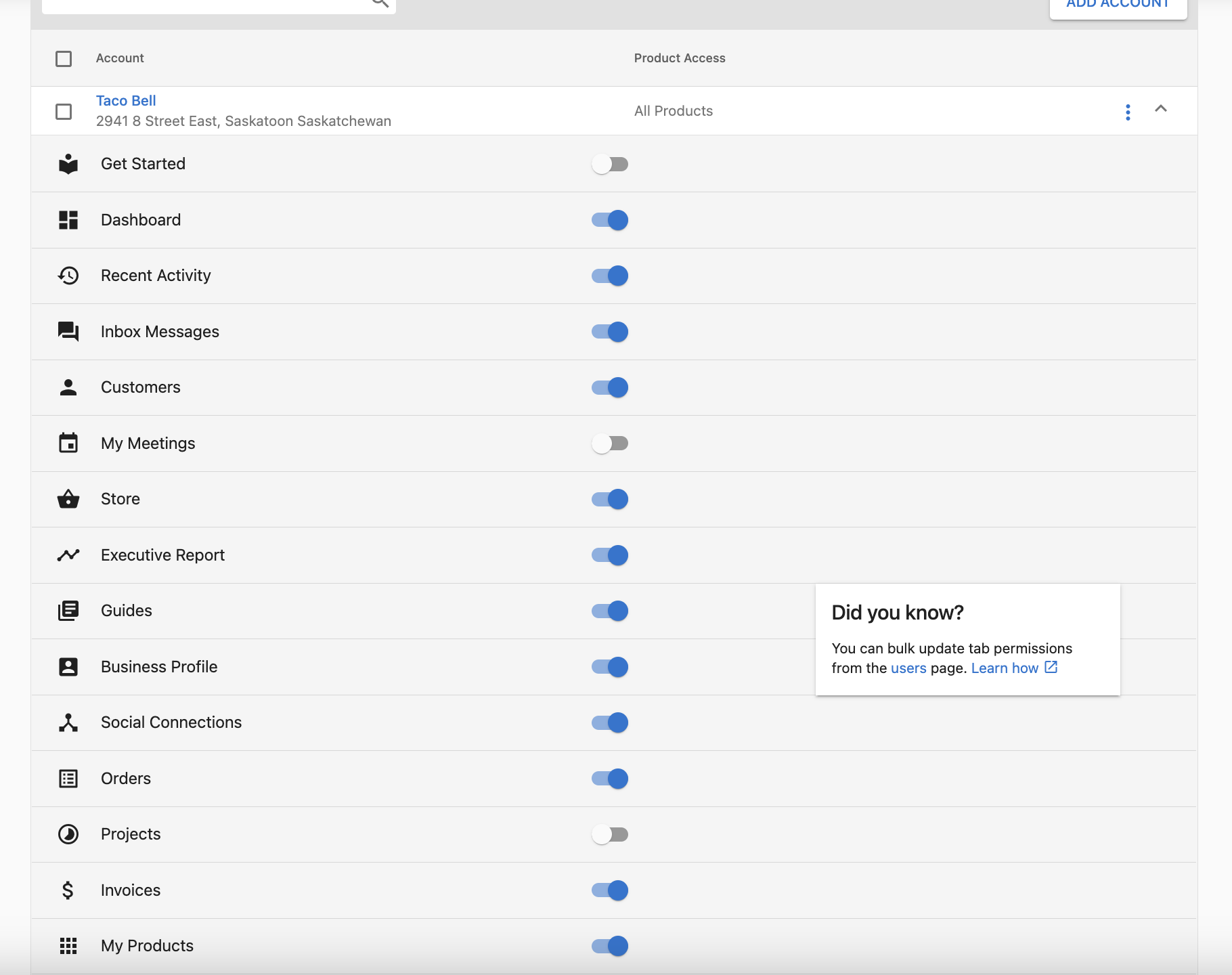
| ba:getStarted:AG-ID | Get Started for AG-ID | businessFeature | Get Started tab |
| ba:dashboard:AG-ID | Dashboard for AG-ID | businessFeature | Dashboard tab |
| ba:inbox:AG-ID | Inbox for AG-ID | businessFeature | Inbox tab |
| ba:messageInInbox:AG-ID | Messaging in Inbox for AG-ID | businessFeature | Messaging within Inbox |
| ba:myMeetings:AG-ID | My Meetings for AG-ID | businessFeature | My Meetings tab |
| ba:store:AG-ID | Store for AG-ID | businessFeature | Store tab |
| ba:customerList:AG-ID | Customer List for AG-ID | businessFeature | Customer List tab |
| ba:executiveReport:AG-ID | Executive Report for AG-ID | businessFeature | Executive Report tab |
| ba:guides:AG-ID | Projects for AG-ID | businessFeature | Projects tab — despite the guides id |
| ba:contentLibrary:AG-ID | Guides (Content Library) for AG-ID | businessFeature | Guides tab |
| ba:files:AG-ID | Files for AG-ID | businessFeature | Files tab |
| ba:businessProfile:AG-ID | Business Profile for AG-ID | businessFeature | Business Profile tab |
| ba:socialConnection:AG-ID | Social Connections for AG-ID | businessFeature | Social Connections tab |
| ba:orders:AG-ID | Orders for AG-ID | businessFeature | Orders tab |
| ba:invoices:AG-ID | Invoices for AG-ID | businessFeature | Invoices tab |
| ba:myProducts:AG-ID | My Products for AG-ID | businessFeature | My Products tab |
| ba:users:AG-ID | User Management for AG-ID | businessFeature | User Management tab |
| ba:ai:AG-ID | AI for AG-ID | businessFeature | AI tab |
| ba:recommendations:AG-ID | Recommendations for AG-ID | businessFeature | Recommendations tab |
| ba:automations:AG-ID | Automations for AG-ID | businessFeature | Automations tab |
| ba:administration:AG-ID | Administration for AG-ID | businessFeature | Administration tab |
ba:guides grants the Projects tab, not Guides. Its display name is "Projects for AG-ID". The Guides tab is ba:contentLibrary. Since a displayName search is an exact match, "Guides for AG-ID" no longer resolves to any group.
For example if AG-ID is AG-MXX5P286VP then the table will look similar to this below
| id | display name |
|---|---|
| ba:access:AG-MXX5P286VP | AG-MXX5P286VP |
| ba:getStarted:AG-MXX5P286VP | Get Started for AG-MXX5P286VP |
| ba:dashboard:AG-MXX5P286VP | Dashboard for AG-MXX5P286VP |
The same groups are shown in below image on how it reflects in Vendasta
To see this permission in partner centre go to partners.vendasta.com > Businesses > Users > Click Kebab Menu(3 vertical dot) on an user > Edit Permissions
List of Platform Groups
Here is the list of available groups you can assign to a partner user.
| id | display name | type |
|---|---|---|
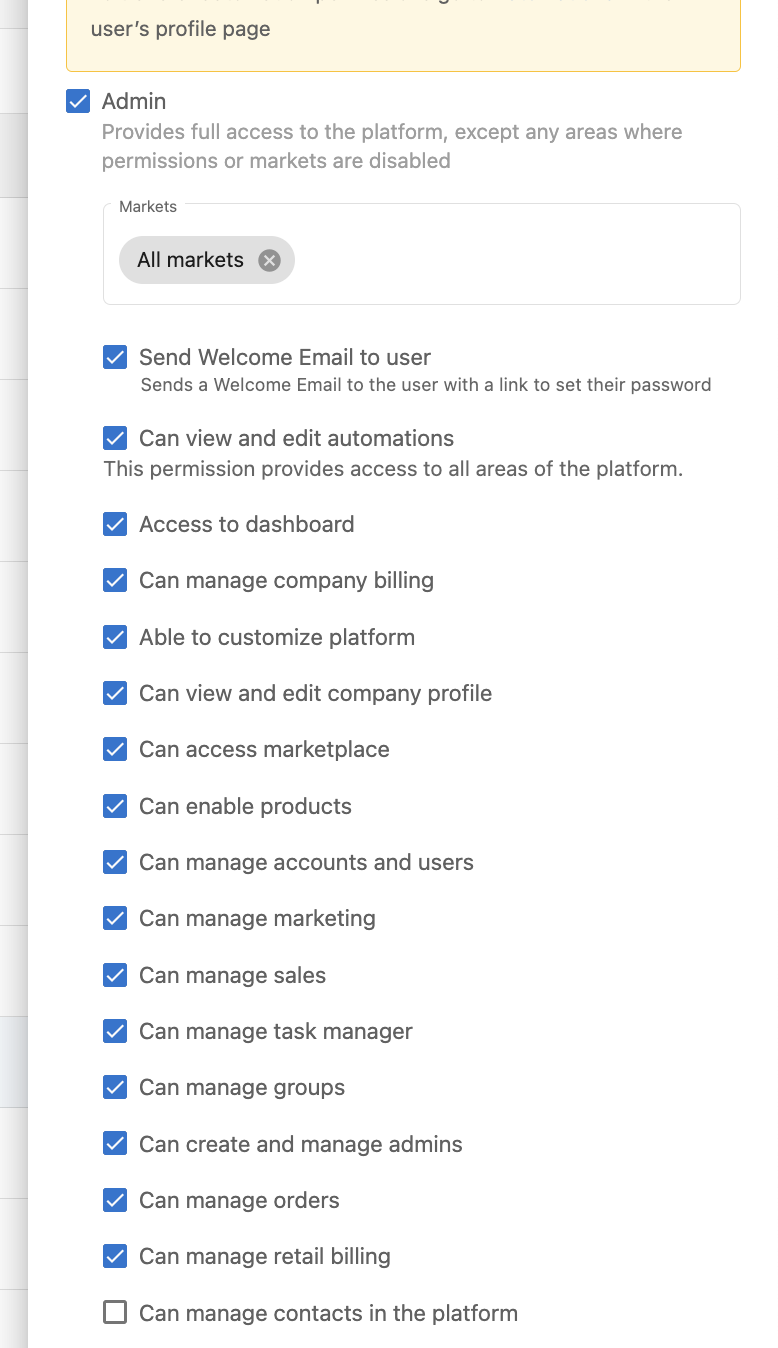
| pc:access | Platform Admin | platformFeature |
| pc:canCustomizeWhitelabel | Can customize platform | platformFeature |
| pc:canAccessBilling | Can manage company billing | platformFeature |
| pc:canManageSales | Can Manage Sales | platformFeature |
| pc:canManageAccounts | Can Manage Accounts and Users | platformFeature |
| pc:canManageTasks | Can Manage Task Manager | platformFeature |
| pc:canAccessBrands | Can Manage Brand | platformFeature |
| pc:canAccessMarketing | Can manage marketing | platformFeature |
| pc:canAccessDashboard | Access to Dashboard | platformFeature |
| pc:canAccessOrders | Can Manage Orders | platformFeature |
| pc:canManageAdmins | Can create and manage admins | platformFeature |
| pc:canAccessMarketplace | Can Access Marketplace | platformFeature |
| pc:canEnableApps | Can Enable Products | platformFeature |
| pc:canAccessCompanyProfile | Can view and edit company profile | platformFeature |
| pc:canAccessAutomations | Can View and Edit Automations | platformFeature |
| pc:canAccessRetailBilling | Can manage retail billing | platformFeature |
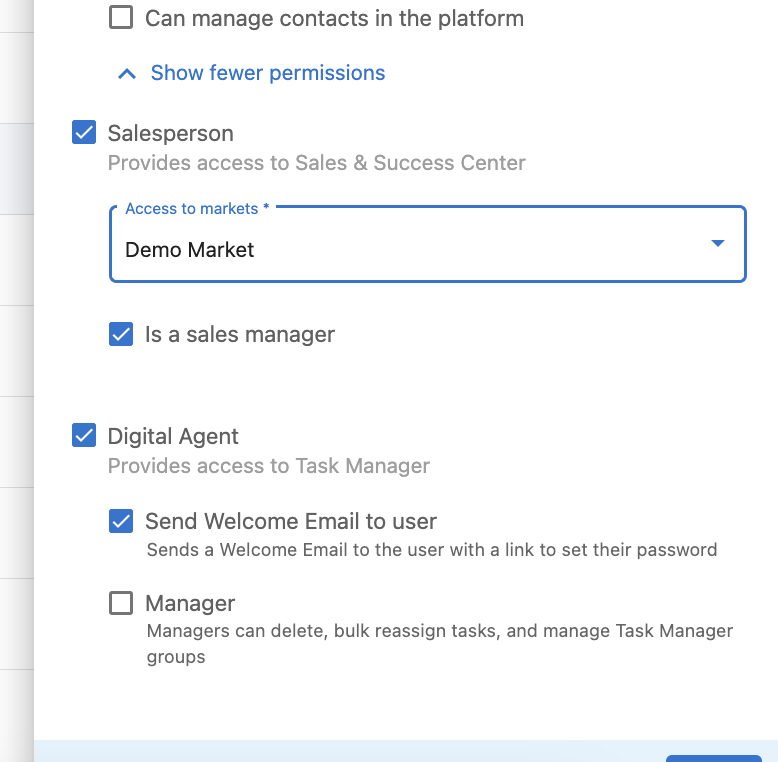
| ssc:access | Can access Sales & Success Center | platformFeature |
| ssc:manage | Is sales manager | platformFeature |
| tm:access | Can access Task Manager | platformFeature |
| tm:manage | Can manage Task Manager | platformFeature |
Some groups grant others with them.
- Assigning
pc:access(Platform Admin) turns on every otherpc:platform feature listed above, and removing it removes them all. Assigning any otherpc:group also turns onpc:access, since a partner user needs platform access to use the feature. ssc:andtm:behave the same way within their own families:ssc:accessgrants everyssc:group,tm:accessgrants everytm:group, and assigningssc:manageortm:managealso turns on the matchingaccessgroup. Removingssc:accessortm:accessremoves its whole family; removingssc:manageortm:manageremoves only that group.- CRM groups do neither. They are granted and removed individually, and they do not turn on
pc:access.
The same groups are shown in below image on how it reflects in Vendasta
CRM permission groups
You can also control how much of the CRM a user can see and edit by assigning CRM permission groups. These mirror the CRM permission controls in the platform UI. For each object (contacts, companies, custom_objects) there are two kinds of group:
crm:<object>:write:<scope>— "Can view and edit" the object, limited to<scope>.crm:<object>:manage— "Can manage the object's fields" (on/off, no scope).
<scope> is own (records assigned to the user), ownunowned (assigned to the user plus unassigned), or all (every record).
| id | display name | type |
|---|---|---|
| crm:contacts:write:own | Can view and edit assigned contacts | platformFeature |
| crm:contacts:write:ownunowned | Can view and edit assigned and unassigned contacts | platformFeature |
| crm:contacts:write:all | Can view and edit all contacts | platformFeature |
| crm:contacts:manage | Can manage contact fields | platformFeature |
| crm:companies:write:own | Can view and edit assigned companies | platformFeature |
| crm:companies:write:ownunowned | Can view and edit assigned and unassigned companies | platformFeature |
| crm:companies:write:all | Can view and edit all companies | platformFeature |
| crm:companies:manage | Can manage company fields | platformFeature |
| crm:custom_objects:write:own | Can view and edit assigned custom objects | platformFeature |
| crm:custom_objects:write:ownunowned | Can view and edit assigned and unassigned custom objects | platformFeature |
| crm:custom_objects:write:all | Can view and edit all custom objects | platformFeature |
| crm:custom_objects:manage | Can manage custom object fields | platformFeature |
One write group per object. A user can be a member of at most one write group for a given object. For example, a user cannot be in both crm:contacts:write:own and crm:contacts:write:all. manage is a plain on/off group with no scope.
Changing a scope is a remove followed by an add, not a single add. Adding crm:contacts:write:all to a user who already holds crm:contacts:write:own conflicts and the request fails, with an error that does not name the conflicting group. Remove the existing write group in its own request first, so the conflict never arises.
GET /{namespace}/Groups/{id} does not resolve crm: ids and returns 400 for them, even though they are listed by GET /{namespace}/Groups and can be granted normally. Use the table above rather than that endpoint to confirm a CRM group id.
To see this permission in partner centre go to partners.vendasta.com > Administration > My Team > Click Kebab Menu(3 vertical dot) on an user > Edit Member
Reading a user's groups
A user's group membership is returned on the user resource, under groups:
{
  "id": "U-e6d11318-2e15-e44c-bc82-77c6b7fc4fac",
  "userName": "barbara@mail.com",
  "groups": [
    { "id": "pc:access", "displayName": "Platform Admin", "type": "platformFeature" },
    { "id": "ba:access:AG-MXX5P286VP", "displayName": "AG-MXX5P286VP", "type": "business" }
  ]
}
Each entry is identified by id — the same id used at /{namespace}/Groups/{id} — rather than the value used by standard SCIM group members.
groups lists the roles the user holds in the namespace in the URL.
groups is read-only: a groups array sent to POST /{namespace}/Users or PUT /{namespace}/Users/{id} is ignored rather than applied. Membership is changed only through the PATCH requests below.
Assigning a user to a group
Provide user access to a business location
For example we want to provide access to the business location AG-MXX5P286VP to an user. Now the id of the group is ba:access:AG-MXX5P286VP
Request
PATCH /Groups/ba%3Aaccess%3AAG-MXX5P286VP HTTP/1.1
{
    "schemas": ["urn:ietf:params:scim:api:messages:2.0:PatchOp"],
    "Operations": [{
        "op": "Add",
        "path": "members",
        "value": [{
            "value": "U-e6d11318-2e15-e44c-bc82-77c6b7fc4fac"
        }]
    }]
}
Provide user access to a platform features
For example we want to make the user Platform Admin, the group id for this is pc:access
Request
PATCH /Groups/pc%3Aaccess HTTP/1.1
{
    "schemas": ["urn:ietf:params:scim:api:messages:2.0:PatchOp"],
    "Operations": [{
        "op": "Add",
        "path": "members",
        "value": [{
            "value": "U-e6d11318-2e15-e44c-bc82-77c6b7fc4fac"
        }]
    }]
}
Provide user a CRM scope
For example we want the user to view and edit only the contacts they own. The group id for this is crm:contacts:write:own (URL-encoded as crm%3Acontacts%3Awrite%3Aown).
Request
PATCH /{namespace}/Groups/crm%3Acontacts%3Awrite%3Aown HTTP/1.1
{
    "schemas": ["urn:ietf:params:scim:api:messages:2.0:PatchOp"],
    "Operations": [{
        "op": "add",
        "path": "members",
        "value": [{
            "value": "U-e6d11318-2e15-e44c-bc82-77c6b7fc4fac"
        }]
    }]
}
You can only add users who belong to your namespace. Create one who doesn't there first with POST /{namespace}/Users by email — otherwise the add is rejected with a 400.
The same membership changes can be made from the user side, with a groups operation on PATCH /{namespace}/Users/{id}. Prefer this path: unlike PATCH /{namespace}/Groups/{id}, it preserves the member's externalId, which the group-side request clears.
Request
PATCH /Users/U-e6d11318-2e15-e44c-bc82-77c6b7fc4fac HTTP/1.1
{
    "schemas": ["urn:ietf:params:scim:api:messages:2.0:PatchOp"],
    "Operations": [{
        "op": "add",
        "path": "groups",
        "value": [{
            "value": "pc:access"
        }]
    }]
}
To remove a group this way, use a value filter on the path: "op": "remove", "path": "groups[value eq \"pc:access\"]".
Removing a user from a group
For example we want to remove Platform Admin role from the user
Request
PATCH /Groups/pc%3Aaccess HTTP/1.1
{
    "schemas": ["urn:ietf:params:scim:api:messages:2.0:PatchOp"],
    "Operations": [{
        "op": "Remove",
        "path": "members",
        "value": [{
            "value": "U-e6d11318-2e15-e44c-bc82-77c6b7fc4fac"
        }]
    }]
}