Guide to use Vendasta SCIM APIs to sync Users
Overview
System for Cross-domain Identity Management (SCIM) focuses on syncing user accounts and permissions between systems but has an extension system that allows syncing any type of record.
This guide provides the information of
- To create a service account in Vendasta and authorization token to access Vendasta APIs
- List of Vendasta SCIM APIs and the way to use it.
Step 1 : Pre-requisites for accessing the Vendasta's SCIM APIs
1. Namespace
You need a namespace which is your Vendasta partner id and it is unique for each partner, this partner id is generated when a new channel partner signs up to Vendasta.
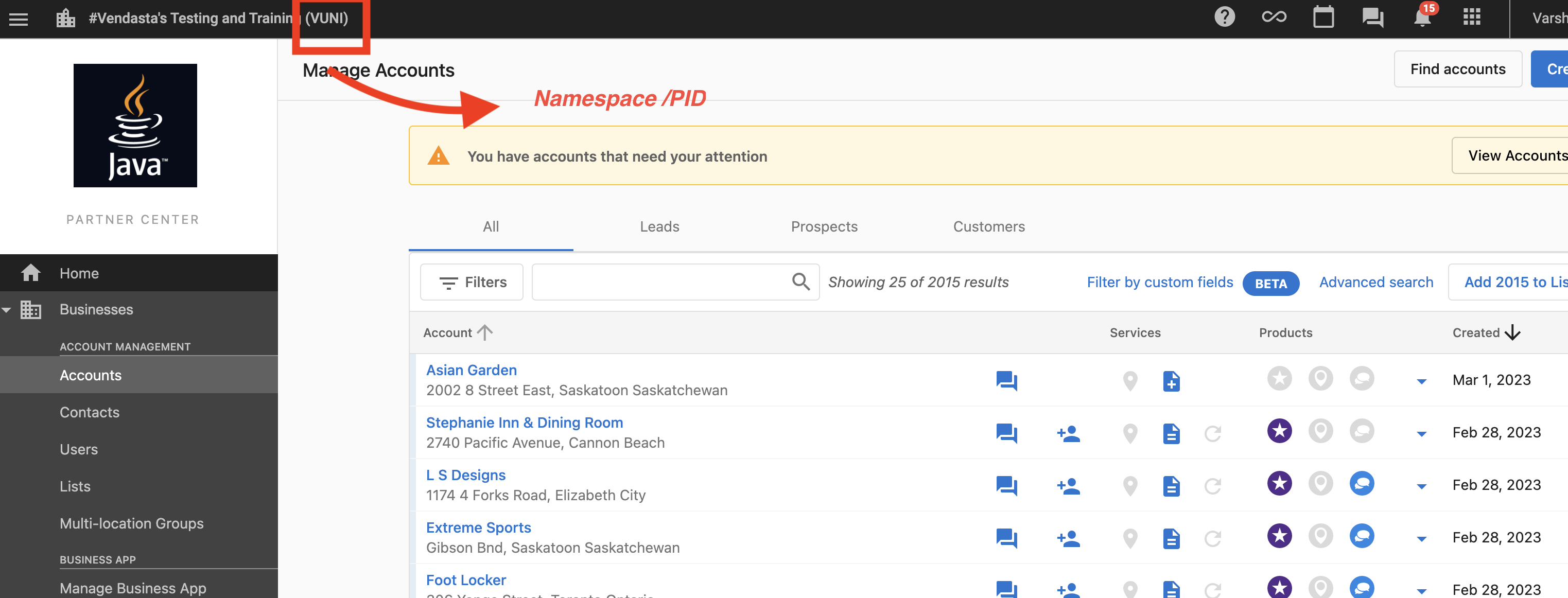
Every request operates in the namespace in the URL, your partner id. You manage the users you create there and the users you grant access to. A request for any other user returns 404, and a user's groups lists the roles they hold in your namespace.
2. Authorization token
You need a authorization token to access Vendasta APIs which should be generated against your namespace with required scope "user.admin"
To create a service account and create a token, see Authorization guide.
Step 2 : Vendasta SCIM Endpoints to sync users
We support set of fields which is used in our SCIM APIs. Also the System Operation section which will expose all of our supported configurations.
Check for an existing user
1. By Vendasta ID
You can search for an existing user by Vendasta id by making a GET request.
If there is no user with the given ID, or they aren't one of yours, you will get a 404 with a "Resource not found" message.
curl -X GET 'https://prod.apigateway.co/scim/{namespace}/Users/{id}' \
  -H 'Authorization: Bearer <Access Token with "user.admin" scope>' \
  -H 'Content-Type: application/scim+json'
2. By Email id
You can search for an existing user by email id by making a GET request.
You use a query named "filter" to filter out using the user Email id.
A lookup for a user who isn't one of yours returns an empty list — totalResults of 0 — rather than a 404.
curl -X GET 'https://prod.apigateway.co/scim/{namespace}/Users?filter=userName+eq+%22user%40mail.com%22' \
  -H 'Authorization: Bearer <Access Token with "user.admin" scope>' \
  -H 'Content-Type: application/scim+json'
Create User
When you want to add a new user, then you can use this API to make a POST request to create a new user by providing the required field. After this operation completes, the user will be added.
If the user already exists then it will throw an error.
curl -X POST 'https://prod.apigateway.co/scim/{namespace}/Users' \
  -H 'Authorization: Bearer <Access Token with "user.admin" scope>' \
  -H 'Content-Type: application/scim+json' \
  -d '{
    "schemas": ["urn:ietf:params:scim:schemas:core:2.0:User"],
    "externalId": "test-scim-external-id",
    "userName": "barbara@mail.com",
    "name": {
      "familyName": "Jensen",
      "givenName": "Barbara"
    },
    "nickName": "Babs",
    "preferredLanguage": "english",
    "timezone": "America/Regina",
    "emails": [
      {"value": "barbara@mail.com", "type": "work", "primary": true}
    ],
    "addresses": [
      {
        "type": "work",
        "streetAddress": "100 Universal City Plaza",
        "locality": "Hollywood",
        "region": "CA-SK",
        "postalCode": "91608",
        "country": "CA"
      }
    ],
    "phoneNumbers": [
      {"value": "+1-306-555-1234", "type": "work"}
    ]
  }'
This body shows only the fields that are stored. id and meta are generated by Vendasta, active and password are ignored, and the email is taken from userName — the emails array is not read on write, so it is shown matching userName rather than differing from it.
For full details on the available fields see SCIM Users
If another user already exists within your platform with the same email address you will get an error when trying to create a new user.
Search users with different filter options
You can search users based on various filters by making a GET request. After this operation completes, list of users based on given filters will be returned.
With no filters
The Endpoint will return all the available Users if we does not provide any filter options
curl -X GET 'https://prod.apigateway.co/scim/{namespace}/Users' \
  -H 'Authorization: Bearer <Access Token with "user.admin" scope>' \
  -H 'Content-Type: application/scim+json'
Filter by email or external id
A filter must be a single eq comparison on either userName or externalId. Combining two comparisons with and or or is not supported — send one request per lookup.
curl -X GET 'https://prod.apigateway.co/scim/{namespace}/Users?filter=externalId+eq+%22user_external_id%22' \
  -H 'Authorization: Bearer <Access Token with "user.admin" scope>' \
  -H 'Content-Type: application/scim+json'
You can even add the count per page, starting index, and sort options
curl -X GET 'https://prod.apigateway.co/scim/{namespace}/Users?count=10&startIndex=1&sortOrder=ascending&sortBy=email' \
  -H 'Authorization: Bearer <Access Token with "user.admin" scope>' \
  -H 'Content-Type: application/scim+json'
You can customize the attributes in the search response by providing these query values.
Only top-level attributes can be selected. familyName and givenName are sub-attributes of name and will not match — request name instead. id, externalId, schemas and meta are always returned regardless of what you ask for.
curl -X GET 'https://prod.apigateway.co/scim/{namespace}/Users?attributes=userName%2Cname%2Cemails&excludedAttributes=addresses' \
  -H 'Authorization: Bearer <Access Token with "user.admin" scope>' \
  -H 'Content-Type: application/scim+json'
All the query values in Search API is optional
For full details on the available fields see SCIM Users
Update User
You can update any existing user by making a PATCH request. One or more attributes could be updated by providing operation path and value. After this operation completes, the provided attributes will be updated and all other attributes remains unchanged.
If there is no user with the given ID, or they aren't one of yours, you will get a 404.
curl -X PATCH 'https://prod.apigateway.co/scim/{namespace}/Users/{id}' \
  -H 'Authorization: Bearer <Access Token with "user.admin" scope>' \
  -H 'Content-Type: application/scim+json' \
  -d '{
    "schemas": ["urn:ietf:params:scim:api:messages:2.0:PatchOp"],
    "Operations": [
      {
        "op": "replace",
        "path": "name.familyName",
        "value": "Jensen-Smith"
      }
    ]
  }'
For full details on the available fields see SCIM Get User
Replace User
You can replace an existing user's profile by making a PUT request. Vendasta loads the stored user, overlays the profile attributes from your request body onto it, and saves the result.
- A profile attribute you omit is cleared. That covers
name.givenName,name.familyName,nickName,preferredLanguage,timezone,addressesandphoneNumbers— anddisplayNamewith them, since it is derived from the two name parts. Send the complete profile on every PUT. PATCH changes one attribute without disturbing the rest, but it does not accept every attribute in that list — see SCIM Patch User supported operations for the ones it does. - Roles and group membership are preserved. A PUT never grants or revokes access — platform features, business locations and business-feature access all survive unchanged, and a
groupsarray in the body is ignored rather than applied. userNameandemailsare not replaced. A PUT cannot change a user's email address.externalIdis replaced from the body alone — omit it and the mapping is cleared (unlikePATCH). See External ID.
If there is no user with the given ID, or they aren't one of yours, you will get a 404.
curl -X PUT 'https://prod.apigateway.co/scim/{namespace}/Users/{id}' \
  -H 'Authorization: Bearer <Access Token with "user.admin" scope>' \
  -H 'Content-Type: application/scim+json' \
  -d '{
    "schemas": ["urn:ietf:params:scim:schemas:core:2.0:User"],
    "externalId": "test-scim-external-id",
    "userName": "barbara@mail.com",
    "name": {
      "familyName": "Jensen",
      "givenName": "Barbara"
    },
    "nickName": "Babs",
    "preferredLanguage": "english",
    "timezone": "America/Regina",
    "emails": [
      {"value": "barbara@mail.com", "type": "work", "primary": true}
    ],
    "addresses": [
      {
        "type": "work",
        "streetAddress": "100 Universal City Plaza",
        "locality": "Hollywood",
        "region": "CA-SK",
        "postalCode": "91608",
        "country": "CA"
      }
    ],
    "phoneNumbers": [
      {"value": "+1-306-555-1234", "type": "work"}
    ]
  }'
This body shows only the fields that are stored. id and meta are generated by Vendasta, active and password are ignored, and the email is taken from userName — the emails array is not read on write, so it is shown matching userName rather than differing from it. A PUT additionally ignores id, which comes from the URL.
For full details on the available fields see SCIM Get User
Delete User
You can remove a user by making a DELETE request with their Vendasta user id.
This removes them from your namespace — their roles there and the Partner Center, Business App and Task Manager records behind them are torn down, and afterwards every operation on that id returns 404. This is permanent, not a temporary deactivation.
The request is permission-checked and returns 403 when your service account is not allowed to change the user.
If there is no user with the given ID, or they aren't one of yours, you will get a 404 stating "Resource not found" — a delete is never silently accepted for a user who is not there.
A 5xx means the teardown did not finish. Retry it. If a retry returns 404, do not read that as the delete having completed — access removed before the failure is not rolled back, so check the user rather than assuming.
curl -X DELETE 'https://prod.apigateway.co/scim/{namespace}/Users/{id}' \
  -H 'Authorization: Bearer <Access Token with "user.admin" scope>' \
  -H 'Content-Type: application/scim+json'
For full details on the available fields see SCIM Get User
External ID
externalId is your own identifier for the user — the id they have in your system — stored alongside the Vendasta user and scoped to your namespace. It is how you find a user again without tracking Vendasta ids, using GET /{namespace}/Users?filter=externalId eq "...".
You choose whether to use it, but once you do, send it on every POST and PUT. A PUT takes externalId from the request body alone, so a request that omits it stores an empty value and the mapping is gone — after which your externalId lookups return an empty list. PATCH does not behave this way: it leaves an externalId you do not mention alone.